Here is how to use UPI Lite in short: turn it on in your UPI app, add money from your bank account once with your UPI PIN, and then pay small amounts up to ₹1,000 without entering the PIN again. The Lite balance can hold up to ₹5,000 at a time.
UPI Lite is meant for small daily spends like tea, auto fares, vegetables and recharges. Because these payments come from a small on-device balance and not straight from your bank account, they go through faster and fail less often when bank servers are busy. This guide explains the limits, the setup steps in BHIM, PhonePe, Google Pay and Paytm, how auto top-up works, real examples, common mistakes, and what to do if something goes wrong.
UPI Lite at a glance
| Feature | Current rule |
|---|---|
| Maximum per payment | ₹1,000 |
| Maximum Lite balance at any time | ₹5,000 |
| UPI PIN for each payment | Not needed |
| UPI PIN to add money | Needed (unless auto top-up mandate is set) |
| Auto top-ups | Up to 5 per day |
| Cost to use | No charge for users |
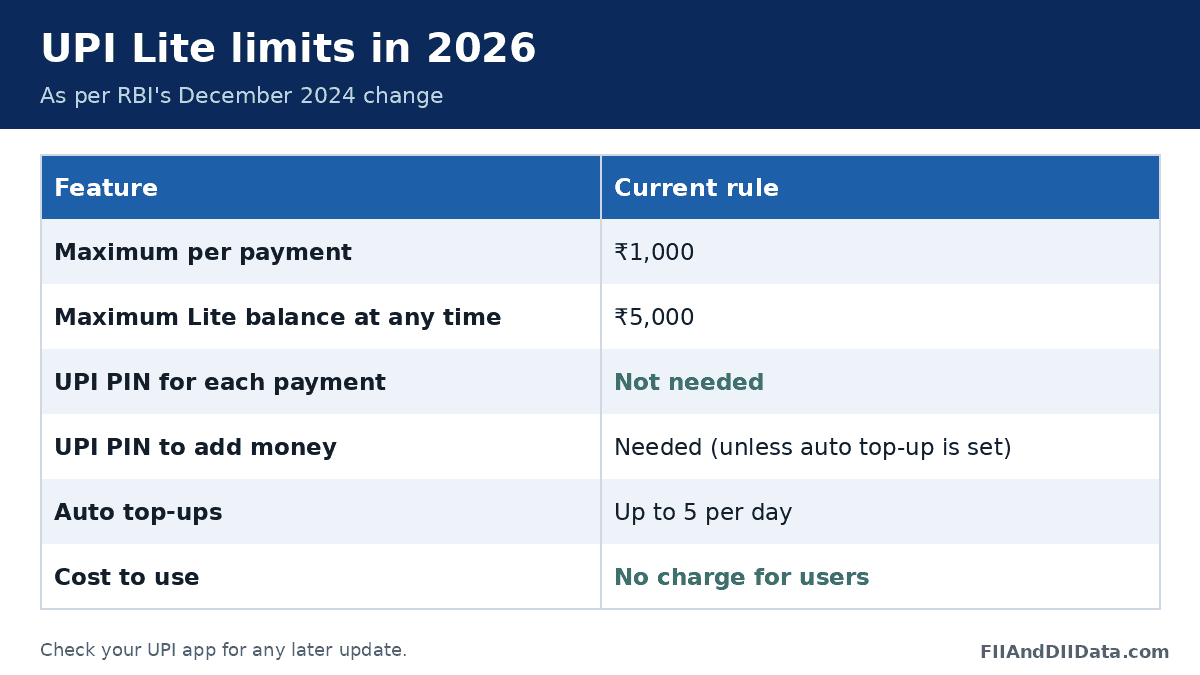
The RBI raised the per-payment limit from ₹500 to ₹1,000 and the balance limit from ₹2,000 to ₹5,000 in December 2024. Auto top-up was added from 1 November 2024. These are the limits that apply in 2026 unless your app shows something newer.
Keep in mind that the ₹5,000 is a cap on the balance at any one moment, not a cap on how much you spend in a day. If you spend ₹4,000 and then top up again, you can spend more. Auto top-ups, though, are limited to 5 a day.
Who UPI Lite is for
Before learning how to use UPI Lite, check whether it suits you. It works best for:
- People who make many payments under ₹500 every day, such as tea, snacks, parking, auto and bus fares.
- Users whose bank often shows “server busy” at peak hours, like the first days of the month or festival sales.
- Anyone who wants a smaller amount exposed on the phone for daily use, while the main bank balance stays behind the UPI PIN.
- Shopkeepers and students who want a cleaner bank statement without dozens of tiny entries.
If you rarely pay small amounts, regular UPI is enough and you can skip it. UPI Lite is also not useful if your bank does not support it yet.
How to use UPI Lite: step-by-step setup
The exact menu names differ between apps such as BHIM, PhonePe, Google Pay and Paytm, but the flow is the same.
- Update your UPI app to the latest version.
- Open the app and look for a “UPI Lite” banner on the home screen or under your profile or payment settings.
- Pick the bank account you want to fund it from. Your bank must support UPI Lite.
- Enter the amount to add (up to ₹5,000) and confirm with your UPI PIN.
- Optionally switch on auto top-up and choose a threshold and refill amount.
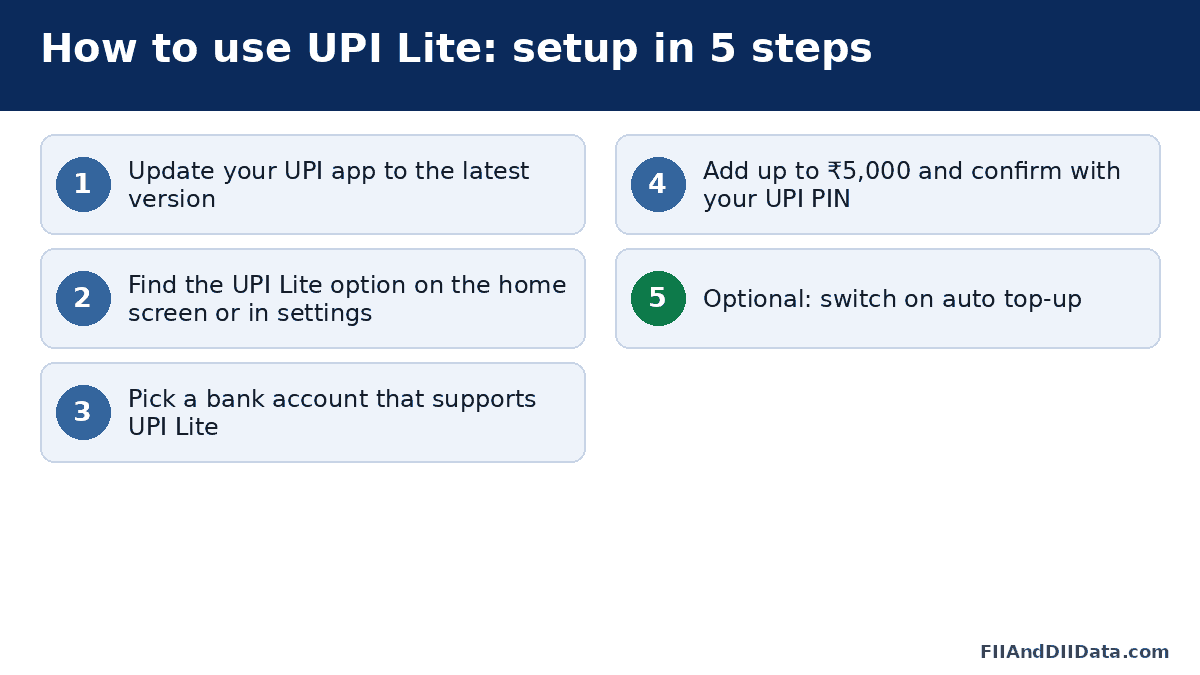
Once the balance shows in the app, UPI Lite is ready. If you cannot find the option, type “UPI Lite” in the app’s search bar. Menu paths change with updates, so follow what your app shows.
Making a payment with UPI Lite
- Scan the shop’s QR code or pick a contact.
- Enter an amount of ₹1,000 or less.
- Select UPI Lite as the payment source if the app does not pick it on its own.
- Tap pay. No PIN is asked, and the amount comes out of your Lite balance.
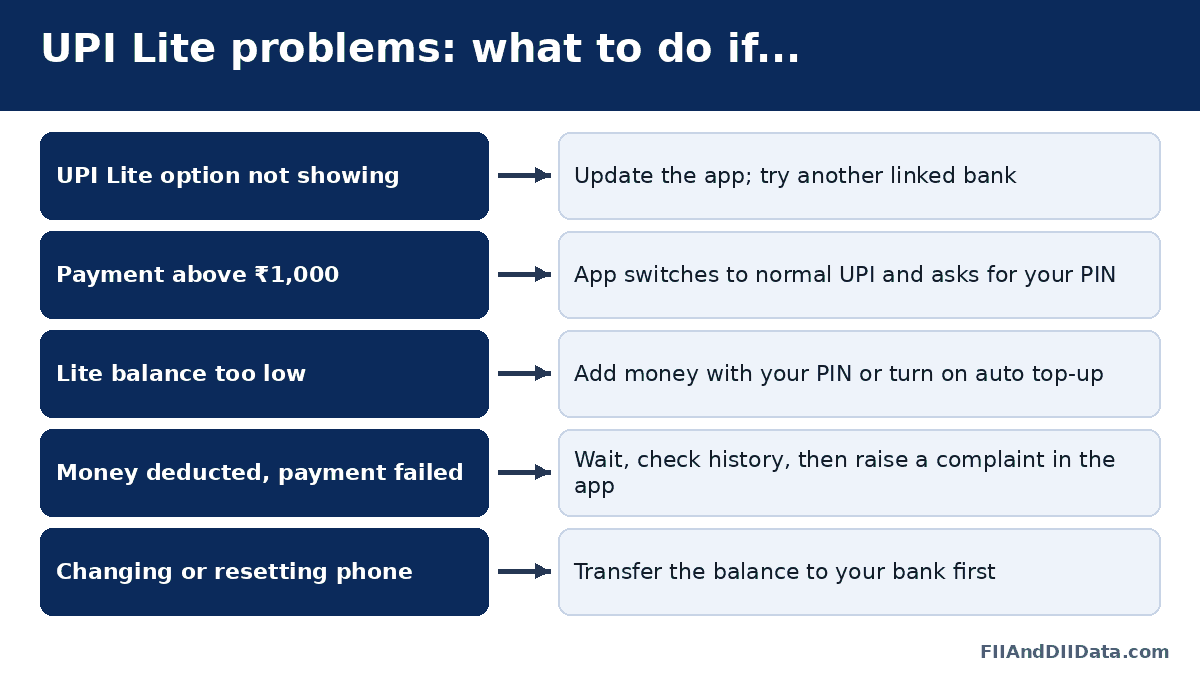
If the amount is above ₹1,000 or above your Lite balance, the app will use your normal bank-linked UPI and ask for the PIN.
A day with UPI Lite: real example
Say you add ₹2,000 to UPI Lite in the morning. At 9 AM you pay ₹30 for tea, at 10 AM ₹120 for an auto, at 1 PM ₹180 for lunch, and at 7 PM ₹450 for vegetables. None of these needs a PIN. Your Lite balance is now ₹1,220.
At 8 PM you try to pay ₹1,400 for a pharmacy bill. That is above the ₹1,000 per-payment cap, so the app switches to your bank account and asks for your UPI PIN. Nothing is taken from the Lite balance for that payment.
Now take a bigger case. If you pay ₹40,000 rent at 10 AM, UPI Lite plays no part at all. That payment goes through regular UPI from your bank account, with your PIN, under your bank’s normal UPI limits. UPI Lite only handles payments of ₹1,000 or less.
How auto top-up works
Auto top-up saves you from refilling by hand. You set a minimum balance. When your Lite balance drops below it, the app pulls a fixed amount from your bank account.
- You approve it once as a mandate in your UPI app.
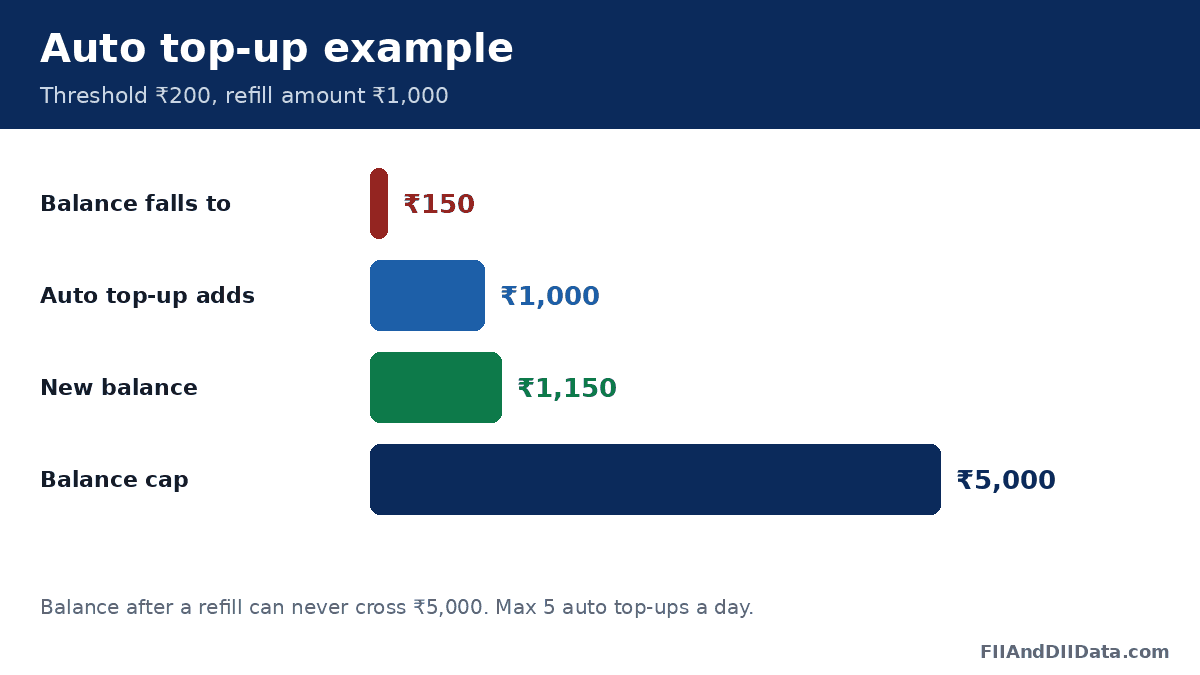
- The balance after a refill still cannot cross ₹5,000.
- A maximum of 5 auto top-ups can happen in a day.
- You can change the amount or cancel the mandate at any time.
Example: you set a threshold of ₹200 and a refill of ₹1,000. When your balance falls to ₹150, ₹1,000 is added, taking it to ₹1,150.
A practical tip: choose a refill amount that matches a normal day or two of small spends. A refill of ₹1,000 to ₹2,000 is enough for most people. Setting the refill very high keeps more money on the phone without much real benefit. If you want to stop auto top-up later, cancel the mandate from the UPI Lite or mandates section of your app; our guide on how to cancel a UPI mandate covers the general steps.
UPI Lite vs regular UPI
| Point | UPI Lite | Regular UPI |
|---|---|---|
| Money comes from | Lite balance on your app | Your bank account directly |
| PIN per payment | No | Yes |
| Per-payment cap | ₹1,000 | Usually ₹1 lakh for most payments (bank limits vary) |
| Best for | Small, frequent spends | Rent, bills, larger transfers |
| Bank statement | Mostly shows top-ups, not each small spend | Shows every payment |
The cleaner bank statement is a side benefit many users like. You can still see each Lite payment in your UPI app history. For the full picture of normal UPI caps, see our guide on the maximum limit of UPI.
Moving money back to your bank
NPCI asked banks and UPI apps to let users move their UPI Lite balance back to the linked bank account without switching UPI Lite off, with a deadline of 31 March 2025. Earlier, the only way was to disable UPI Lite, after which the remaining balance was credited back to the bank.
In practice, most apps now show a “transfer to bank” or “disable UPI Lite” option. The exact label and whether both options are there may vary by bank/app; check in your app. Use this option before you uninstall the app, change phones or stop using UPI Lite.
Common mistakes to avoid
- Keeping the maximum ₹5,000 all the time. If the phone is lost while unlocked, the whole balance is at risk. Keep only what you need for a few days.
- Setting no screen lock. PIN-free payments depend on your phone lock. NPCI also asked UPI Lite apps to use a passcode, biometric or pattern lock at app login.
- Uninstalling the app with money still in Lite. Move the balance to your bank first.
- Expecting UPI Lite for big bills. Anything above ₹1,000 goes through normal UPI with your PIN.
- Forgetting about the auto top-up mandate. Review it every few months so refills match your spending.
Safety tips and common problems
Keep your phone locked
Since Lite payments need no PIN, anyone holding your unlocked phone could spend the balance. Use a screen lock and the app lock inside your UPI app. Keep the balance at a level you are fine with losing in the worst case.
Never share your UPI PIN
You still need your UPI PIN to add money. No bank, NPCI or app staff will ever ask for it. If you have forgotten it, reset it in the app as shown in our forgot UPI PIN guide.
UPI Lite option not showing
Update the app. If it still does not appear, your bank may not support UPI Lite yet. Try another linked bank account.
Changing phones
The Lite balance is tied to the app on your device. Before you change phones or uninstall the app, move the balance back to your bank or use it up. How the balance is handled on reinstall may vary by bank/app; check in your app.
Payment failed but money deducted
Wait a short while and check the app history. If it is not reversed, raise a complaint from the transaction screen in your UPI app. Our guide on UPI transaction failed explains the next steps and timelines.
What to do if something goes wrong
| Situation | What to do |
|---|---|
| Lost phone with Lite balance | Call your bank to block UPI on that number and ask about the Lite balance |
| Wrong amount paid to a shop | Ask the shop to send it back; if not, raise a dispute in the app |
| Auto top-up taking too much | Lower the refill amount or cancel the mandate |
| Bank changed or account closed | Move the Lite balance out first, then remove the account |
| Lite payment shows pending | Check app history after some time before paying again |
FAQs on how to use UPI Lite
What is the UPI Lite limit in 2026?
You can pay up to ₹1,000 per payment and keep up to ₹5,000 in the Lite balance at any time.
Does UPI Lite need a PIN?
Not for payments. You need the UPI PIN only when you add money by hand.
Is there any charge for UPI Lite?
No. Users do not pay any fee to set up or use UPI Lite.
Can I move UPI Lite money back to my bank?
Yes. NPCI asked apps to offer a transfer-out option by 31 March 2025, and disabling UPI Lite also returns the balance to the linked account. The exact option may vary by app.
How many auto top-ups can happen in a day?
Up to 5. The balance after any top-up still cannot cross ₹5,000.
Can I pay more than ₹1,000 using UPI Lite?
No. For a bigger amount, the app uses regular UPI from your bank account and asks for your PIN.
Is UPI Lite the same as a wallet?
No. UPI Lite is a feature of UPI tied to your bank account. An app wallet is a separate prepaid product with its own KYC rules. See our comparison: PhonePe Wallet vs UPI Lite.
Which apps support UPI Lite?
Popular apps such as BHIM, PhonePe, Google Pay and Paytm offer it, but your bank must support it too. Check in your app.
Conclusion
Now you know how to use UPI Lite: switch it on, add a small balance with your PIN, and pay up to ₹1,000 without the PIN. Keep the balance modest, lock your phone, review your auto top-up, and use regular UPI for anything above ₹1,000. For more topics on limits, PINs and complaints, browse all our UPI guides or the personal finance section.
Sources: NPCI, RBI, Outlook Money (RBI limit change, Dec 2024), Outlook Money (auto top-up, Nov 2024), Angel One (NPCI UPI Lite transfer-out circular, Feb 2025).
This guide is for general information only. Limits and features can change; check your bank or UPI app for the latest details. FIIAndDIIData.com is not affiliated with NPCI or any UPI app.